How Centercode Works


Plan & Launch in Minutes

AI-generated test plans and surveys help you start smarter—and faster.

Learn more→

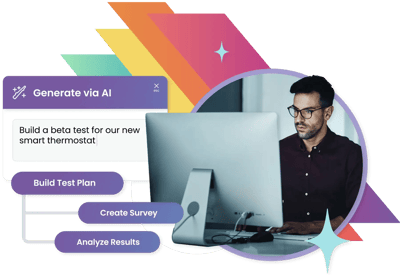
A man working at a computer with an interface labeled ‘Generate via AI.’ A prompt reads: ‘Build a beta test for our new smart thermostat.’ Below, buttons indicate tasks like ‘Build Test Plan,’ ‘Create Survey,’ and ‘Analyze Results.’ Colorful geometric shapes frame the design.
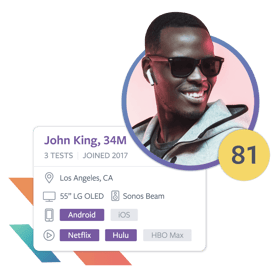
Profile card displaying a smiling man wearing sunglasses, labeled ‘John King, 34M.’ The card shows details such as location (Los Angeles, CA), devices (55” LG OLED, Sonos Beam), operating systems (Android, iOS), and streaming platforms (Netflix, Hulu). A yellow badge with ‘81’ indicates a score or rating.

Recruit & Engage the Right Testers

Target real users, automate onboarding, and guide them through tasks.

Learn more→

See What Testers Experience

Built-in video and screen recording gives you real-world context.

Learn more→

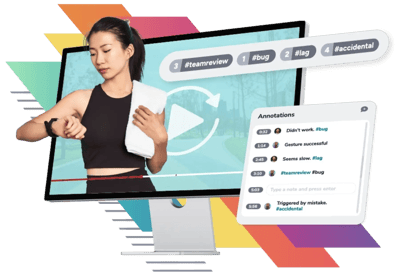
A woman wearing workout attire interacts with a smartwatch in front of a computer screen showing a video playback tool. Annotations are listed by timestamp, with labels like ‘bug,’ ‘team review,’ and ‘accidental.’ Hashtags categorize feedback for easier tracking.
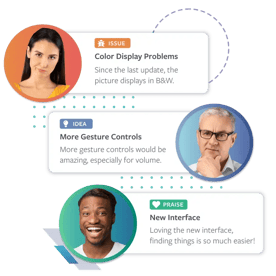
Three feedback cards displayed with user photos and categories. The first card labeled ‘Issue’ highlights a color display problem. The second card labeled ‘Idea’ suggests adding more gesture controls. The third card labeled ‘Praise’ praises a new interface for ease of use.

Collect High-Quality Feedback

Issues, ideas, praise, and more—organized, deduplicated, and ready to act on.

Learn more→

Analyze & Share Insights Fast

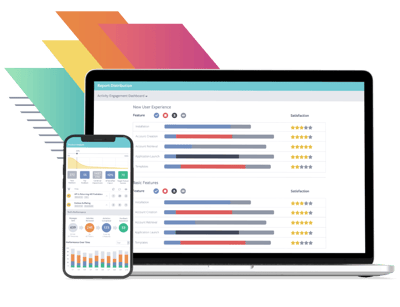
Auto-generated dashboards and summaries surface what matters.

Learn more→

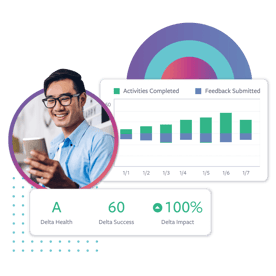
Metrics dashboard featuring a smiling man using a smartphone. Bar graph displays activities completed and feedback submitted over several days. Additional metrics include Delta Health (‘A’), Delta Success (60), and Delta Impact (100%) with a colorful circular chart in the background.
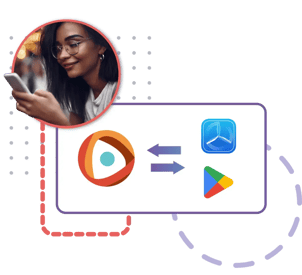
Diagram showing a smiling woman using a smartphone, alongside a flowchart illustrating compatibility or data transfer between different platforms. Arrows connect an orange app icon to both a blue icon resembling Huawei’s AppGallery and the Google Play Store icon, suggesting cross-platform functionality.

Test Web, Mobile, Hardware

Optimized for all product types and integrated into TestFlight and Google Play.

Learn more→

The Best Brands Perfect Their Products With Centercode

Each day the world's most recognizable companies use Centercode to collaborate with their target markets to launch amazing products.
customer logo_AMD
customer logo_Apple
customer logo_Comcast
customer logo_Disney
customer logo_Fitbit
customer logo_Honda Innovations
customer logo_Microsoft
customer logo_VMware
customer logo_Wyze
customer logo_Yale
customer logo_Zoom
customer logo_August
customer logo_Autodesk
customer logo_Belkin
customer logo_Cisco
customer logo_Intel
customer logo_Intuit
customer logo_Peacock
customer logo_Peloton
customer logo_Tableau
customer logo_T-Mobile
customer logo_Verizon
customer logo_Avid
customer logo_Weber Grills

Let’s explore how Centercode can transform
customer testing in your organization.

See how your team can automate test planning and feedback analysis,  capture richer insights through real-world video recordings, and eliminate testing chaos across mobile, web, and hardware environments.